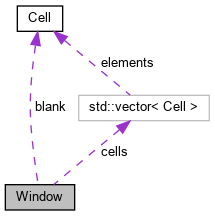
#include <window.hh>
|
| | Window (std::size_t xs, std::size_t ys) |
| |
| void | FillBox (std::size_t x, std::size_t y, std::size_t width, std::size_t height) |
| |
| void | FillBox (std::size_t x, std::size_t y, std::size_t width, std::size_t height, Cell with) |
| |
| void | CopyText (std::size_t tgtx, std::size_t tgty, std::size_t srcx, std::size_t srcy, std::size_t width, std::size_t height) |
| |
| void | Dirtify (std::size_t x, std::size_t y) |
| |
| void | Dirtify () |
| |
| void | PutCh (std::size_t x, std::size_t y, const Cell &c) |
| |
| void | PutCh (std::size_t x, std::size_t y, char32_t c, int cset=0) |
| |
| void | PutCh_KeepAttr (std::size_t x, std::size_t y, char32_t c, int cset=0) |
| |
| void | PutCh_KeepChar (std::size_t x, std::size_t y, const Cell &c) |
| |
| void | Render (std::size_t fx, std::size_t fy, std::uint32_t *pixels) |
| |
| void | Resize (std::size_t newsx, std::size_t newsy) |
| |
| void | LineSetRenderSize (unsigned val) |
| |
|
|
std::vector< Cell > | cells |
| | Storage for cells. Indexed row-first. Size: xsize*ysize */.
|
| |
|
std::size_t | xsize |
| | Width of window in cells.
|
| |
|
std::size_t | ysize |
| | Height of window in cells.
|
| |
|
std::size_t | cursx =0 |
| | Cursor location (horizontal)
|
| |
|
std::size_t | cursy =0 |
| | Cursor location (vertical)
|
| |
|
bool | inverse = false |
| | Whether screen-wide inverse effect is in effect.
|
| |
|
bool | cursorvis = true |
| | Whether cursor is visible.
|
| |
|
unsigned | cursorcolor = 0xFFFFFF |
| | Color of cursor.
|
| |
|
unsigned | mousecolor1 = 0xFFFFFF |
| | Ignored.
|
| |
|
unsigned | mousecolor2 = 0xFFFFFF |
| | Ignored.
|
| |
|
unsigned | mouseselectcolor = 0xFFFFFF |
| | Ignored.
|
| |
|
Cell | blank {} |
| | The current "blank" cell. It is used as the model cell for inserting empty rows.
|
| |
Window: A two-dimensional storage for cells.
◆ Window()
| Window::Window |
( |
std::size_t |
xs, |
|
|
std::size_t |
ys |
|
) |
| |
|
inline |
Initializes the window to the given size. Each cell is default-initialized.
◆ CopyText()
| void Window::CopyText |
( |
std::size_t |
tgtx, |
|
|
std::size_t |
tgty, |
|
|
std::size_t |
srcx, |
|
|
std::size_t |
srcy, |
|
|
std::size_t |
width, |
|
|
std::size_t |
height |
|
) |
| |
|
inline |
Copies a rectangle from given coordinates to the target coordinates.
- Parameters
-
| tgtx | Target X-coordinate |
| tgty | Target Y-coordinate |
| srcx | Source X-coordinate |
| srcy | Source Y-coordinate |
| width | Width of region to copy |
| height | Height of region to copy |
◆ Dirtify() [1/2]
Marks entire screen as dirty (without changing ch) and forgets the cursor's last known position.
◆ Dirtify() [2/2]
| void Window::Dirtify |
( |
std::size_t |
x, |
|
|
std::size_t |
y |
|
) |
| |
|
inline |
Marks the given cell as dirty and places an invalid character there.
◆ FillBox() [1/2]
| void Window::FillBox |
( |
std::size_t |
x, |
|
|
std::size_t |
y, |
|
|
std::size_t |
width, |
|
|
std::size_t |
height |
|
) |
| |
|
inline |
Used in scrolling: Fills the given region with the blank character.
◆ FillBox() [2/2]
| void Window::FillBox |
( |
std::size_t |
x, |
|
|
std::size_t |
y, |
|
|
std::size_t |
width, |
|
|
std::size_t |
height, |
|
|
Cell |
with |
|
) |
| |
|
inline |
Used in erasing: Fills the given region with the given character, but does not change protected cells.
◆ LineSetRenderSize()
| void Window::LineSetRenderSize |
( |
unsigned |
val | ) |
|
Changes the render_size attribute on current cursor line (cursy) to the specified value.
- Parameters
-
| val | Value to be copied to the render_size attribute on the cells of that row. 0=normal, 1=doublewidth, 2=doublewidth+topline, 3=doublewidth+bottomline |
◆ PutCh() [1/2]
| void Window::PutCh |
( |
std::size_t |
x, |
|
|
std::size_t |
y, |
|
|
char32_t |
c, |
|
|
int |
cset = 0 |
|
) |
| |
|
inline |
Places a character at the given position on screen. Attributes are copied from the blank cell, except render_size which is kept unchanged.
◆ PutCh() [2/2]
| void Window::PutCh |
( |
std::size_t |
x, |
|
|
std::size_t |
y, |
|
|
const Cell & |
c |
|
) |
| |
|
inline |
Places a cell at the given position on screen. If the cell changed, it is marked dirty.
◆ PutCh_KeepAttr()
| void Window::PutCh_KeepAttr |
( |
std::size_t |
x, |
|
|
std::size_t |
y, |
|
|
char32_t |
c, |
|
|
int |
cset = 0 |
|
) |
| |
|
inline |
Same as PutCh(x,y,c,cset), but instead of taking attributes from the blank cell, preserves existing attributes on screen.
◆ PutCh_KeepChar()
| void Window::PutCh_KeepChar |
( |
std::size_t |
x, |
|
|
std::size_t |
y, |
|
|
const Cell & |
c |
|
) |
| |
|
inline |
Same as PutCh(x,y,c), but preserves existing character symbol on screen.
◆ Render()
| void Window::Render |
( |
std::size_t |
fx, |
|
|
std::size_t |
fy, |
|
|
std::uint32_t * |
pixels |
|
) |
| |
Renders the screen into a pixel buffer using given font size. Only changed regions are rendered. Variables that are used to optimize the rendering (to save work) are the dirty flag in cells, lastcurs, lastcury and lasttimer.
- Parameters
-
| fx | Font width in pixels. |
| fy | Font height in pixels. |
| pixels | Target buffer which must have room for at least fx*xsize*fy*ysize pixels. |
◆ Resize()
| void Window::Resize |
( |
std::size_t |
newsx, |
|
|
std::size_t |
newsy |
|
) |
| |
Resizes the window to the new size, keeping existing contents. The entire screen is marked dirty. If the cursor is outside the new boundaries of the window, it is placed in the bottom row or rightmost column where necessary to keep it inside the boundaries.
The documentation for this struct was generated from the following files: